The Complete Guide to Practice Verification
Stroke Gained Team
You've heard it a thousand times: "Practice doesn't make perfect. Perfect practice makes perfect."
But here's the problem — how do you know if your practice is actually perfect? Without a coach standing over your shoulder, you're guessing. And most golfers practice their mistakes more than their improvements.
The research backs this up. Motor learning studies consistently show that unguided practice can actually reinforce bad habits, because the brain doesn't distinguish between "correct" repetitions and "incorrect" ones — it just strengthens whatever pattern you repeat most. Dr. K. Anders Ericsson's work on deliberate practice makes this explicit: improvement requires immediate, accurate feedback on each attempt. Without it, you're just exercising, not improving.
That's why we built practice verification into Stroke Gained. Not as a gimmick — as the core feedback loop that makes the entire coaching model work.
Why Practice Verification Matters (The Data)
The gap between coached practice and solo practice is one of the biggest unsolved problems in golf instruction. TPI's research on motor learning shows that swing pattern changes require 3,000-5,000 quality repetitions to become automatic. The average lesson provides 50-80 swings. That means 98% of the repetitions needed for lasting change happen outside the lesson — on the range, at home, during solo practice sessions where there's no one to verify quality.
A 2019 study in the International Journal of Golf Science found that only 23% of students consistently followed their coach's prescribed drills between lessons. The remaining 77% either modified the drill, forgot specifics, or practiced something entirely different based on a tip they saw online.
The result: coaches re-diagnose the same issues lesson after lesson. Students feel like they're not improving despite spending time and money. And the coaching relationship erodes because neither side can objectively verify what happened between sessions.
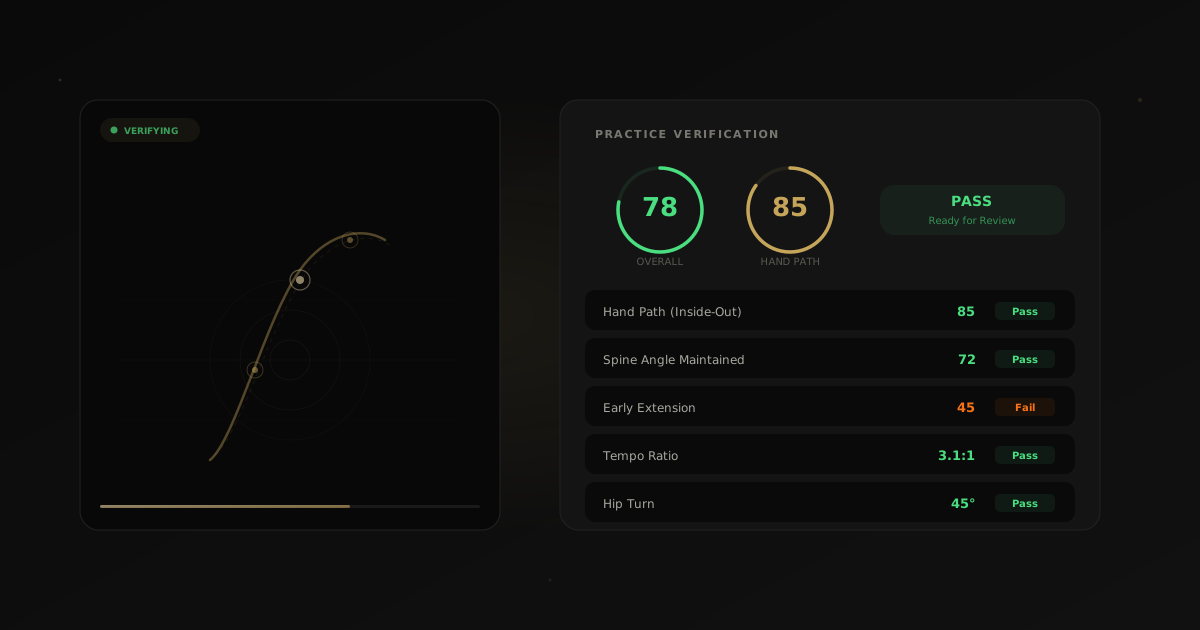
Practice verification closes this gap by giving every practice rep a score, a record, and a feedback mechanism — without requiring the coach to be physically present.
How It Works (The Technical Deep Dive)
When your coach assigns a prescription — say, "Fix your early extension with these three drills" — here's exactly what happens when you submit a practice video:
Step 1: Pose Detection
Google's MediaPipe runs directly in your browser using WebAssembly — no server upload needed for the biomechanical analysis. It maps 33 body landmarks across every frame of your swing, creating a complete skeleton model in real time.
These 33 landmarks include:
- Upper body: Nose, eyes, ears, shoulders, elbows, wrists, and multiple hand points
- Torso: Shoulder midpoint, hip midpoint, spine reference points
- Lower body: Hips, knees, ankles, feet (heel and toe)
MediaPipe achieves sub-centimeter tracking accuracy in good conditions — comparable to professional motion capture systems like Vicon or OptiTrack that cost $50,000+. The key difference: those systems require a dedicated studio with infrared cameras. MediaPipe runs on your phone's standard camera.
The skeleton model updates every frame (33ms at 30fps, 16ms at 60fps), creating a continuous 3D motion map of your entire swing from address through follow-through.
Step 2: Key Position Extraction
From the continuous landmark stream, the AI identifies the six critical swing positions:
- Address — detected when body landmarks are stationary and the wrists are positioned in front of the body
- Takeaway — the first frame where wrist velocity exceeds a threshold, indicating movement has begun
- Top of backswing — the frame where lead wrist vertical velocity crosses zero (maximum height before reversal)
- Transition — the 2-4 frame window where lower body motion reverses before upper body follows
- Impact — detected by rapid wrist deceleration and hip rotation reaching near-maximum
- Follow-through — the completion position where body landmarks stabilize again
These aren't hardcoded frames — they're dynamically identified based on the physics of your specific swing. A slow-tempo player's top-of-backswing will be at a different frame than a quick-tempo player's, and the AI handles this automatically.
Step 3: Metrics Extraction
From those landmarks and key positions, the AI calculates the specific metrics that matter for your drill:
Hand Path The AI tracks the trail hand through the entire downswing and maps its path relative to the swing plane. An over-the-top move shows the hands moving outside the plane during transition. An inside-out path shows the hands dropping below the plane. The metric is expressed as degrees of deviation from the target plane at three checkpoints: transition, halfway down, and pre-impact.
Early Extension Measured as the change in distance between your hip center and the ball position from address to impact. At address, this baseline distance is set. If your hips move closer to the ball during the downswing, that's early extension — your hips are thrusting toward the ball instead of rotating around a stable axis. TPI data shows 64% of amateur golfers exhibit early extension, making it one of the most common faults the AI scores.
Spine Angle Maintenance The AI calculates the angle of your spine relative to the ground at address and tracks it through impact. The measurement is taken from the midpoint between your shoulders to the midpoint between your hips. A loss of posture — standing up through the ball — shows up as a decrease in this angle. Even 3-5 degrees of change can cause significant contact issues, and the AI detects changes as small as 2 degrees.
Hip Turn Measured as the rotational angle of the hip line (left hip to right hip) relative to the target line. At address, most golfers have 0-5 degrees of hip rotation. At the top of the backswing, good players achieve 40-50 degrees. At impact, the hips should be 30-45 degrees open to the target. The AI measures all three checkpoints and compares them to benchmarks based on your swing type and speed.
Tempo John Novosel's Tour Tempo research identified a 3:1 backswing-to-downswing ratio among professional golfers — 21 frames back, 7 frames down at 30fps (0.7 seconds and 0.23 seconds). Yale biomechanics researchers (Grober and Cholewicki) independently confirmed this ratio through peer-reviewed analysis.
The AI calculates your exact ratio by measuring the time from takeaway to top of backswing (backswing duration) divided by the time from top of backswing to impact (downswing duration). A ratio of 2.8:1 to 3.2:1 is considered optimal. Ratios above 3.5:1 (slow transition) or below 2.5:1 (rushed transition) typically correlate with inconsistency.
Step 4: Focus Area Scoring
This is what makes practice verification different from generic swing analysis. Since your coach prescribed a specific focus area, the AI weights that metric heavily in the scoring.
A prescription for "hand path" will prioritize whether your club path improved relative to your baseline, while still tracking overall form metrics as secondary scores. The focus area accounts for 60% of the total score, with the remaining 40% distributed across general fundamentals (posture, tempo, balance).
This means you can have an imperfect swing overall but still score well if the specific thing your coach asked you to work on shows improvement. That's by design — coaching is about progressive improvement on priority items, not perfection on everything simultaneously.
Step 5: Results + Keyframes
You get a complete results package:
- Overall score (0-100) — weighted composite of all metrics
- Focus area score (0-100) — how well you executed the prescribed correction
- Keyframe snapshots — still images at address, top of backswing, and impact with skeleton overlays showing your actual body positions
- Metric breakdown — individual scores for each measured metric with trend arrows showing improvement or regression from previous submissions
What the Scores Mean
The scoring system is calibrated against TPI benchmarks and Tour Tempo research:
- 80-100: Excellent. Your mechanics match the target pattern. The prescribed correction is being executed consistently.
- 60-79: Good progress. Most fundamentals are there, with room to tighten up. The focus area shows meaningful improvement from baseline.
- 40-59: Needs work. The focus area still shows the original fault pattern, though there may be partial improvement.
- Below 40: The drill isn't clicking yet. The original fault is still dominant. Review your coach's instructions, check your camera angle, and try again.
A score of 60+ is considered a "pass" — meaning the AI believes you're executing the prescribed correction well enough that the motor pattern is beginning to change. Your coach can adjust this threshold per student if they prefer a higher or lower bar.
Important context on scoring: these aren't grades. A 65 after two weeks of working on early extension — when your baseline was 30 — represents massive improvement. The numbers track trajectory, not absolute perfection. Your coach sees the trend, and that's what matters for programming the next phase of instruction.
The Coach Reviews Everything
Practice verification isn't a replacement for your coach. It's a force multiplier. Every submission goes into your coach's review queue with full context:
- Your video with frame-by-frame playback controls
- The AI scores and metrics breakdown for each measured parameter
- Keyframe snapshots with pose overlays showing body positions at critical moments
- Trend data showing how this submission compares to your previous ones
- A comment thread for asynchronous feedback
Your coach can:
- Approve the submission — confirming the AI's assessment and moving you to the next progression
- Add feedback — noting something the AI can't see (grip change, tension, rhythm feel) with text or annotated screenshots
- Request a resubmit — with specific notes on what to adjust and what camera angle to use
This workflow means the coach spends 2-3 minutes reviewing what would have taken 15-20 minutes of video review without AI pre-processing. Over a roster of 30-50 active students, that's the difference between physically being able to review everyone's practice and not.
Why Client-Side Processing Matters
All the heavy pose detection runs in your browser using MediaPipe's WebAssembly engine. This architectural decision has three important consequences:
Privacy
Your video doesn't leave your device for pose analysis. The landmark detection, metric calculation, and scoring all happen locally on your phone or laptop. The video itself is uploaded to secure cloud storage so your coach can review it — but the AI biomechanical analysis happens entirely client-side.
This matters for coaches working with junior golfers, where parents have legitimate concerns about video storage and processing. The analysis data (skeleton coordinates, scores, metrics) is abstracted — it's math, not imagery.
Speed
No waiting for server processing. The analysis runs as fast as your device can process it — typically 3-5 seconds for a full swing analysis on a modern smartphone (iPhone 12+ or equivalent Android). There's no upload queue, no processing wait time, no "check back in 10 minutes" delay.
Cost
No GPU server bills means the feature is free for users. Client-side processing scales to millions of users without proportional server cost increases. This is a deliberate architectural choice — practice verification should be accessible to every golfer, not locked behind a premium tier.
The tradeoff: client-side processing is slightly less accurate than server-side models running on dedicated GPUs. MediaPipe in the browser achieves roughly 85-90% of the accuracy of server-grade pose estimation models. For practice verification purposes — where you're measuring improvement over time, not clinical-grade biomechanics — this is more than sufficient. The signal-to-noise ratio is strong enough to reliably detect the patterns coaches need.
Tips for Better Scores (and Better Data)
The accuracy of AI scoring depends heavily on input quality. Here's how to get the most reliable results:
Camera Angle Matters Most
Use the angle your coach specified — either face-on (camera directly in front of you, facing your chest) or down-the-line (camera behind you, aimed along the target line). These are the two standard angles because they give the AI the clearest view of the critical movement planes.
- Face-on is best for: hip turn, spine angle, early extension, lateral movement, weight shift
- Down-the-line is best for: hand path, swing plane, shaft lean, head position through impact
If your coach doesn't specify, down-the-line is the most versatile default.
Full Swing in Frame
Make sure your entire body is visible from address to follow-through — including your feet and the space above your head at the top of the backswing. Cropping out body landmarks forces the AI to estimate missing positions, which reduces accuracy.
Position yourself 8-10 feet from the camera. Use a tripod, a phone holder, or lean your phone against your bag at hip height.
Good Lighting
Avoid backlighting (sun behind you, dark body silhouette against bright sky) or deep shadows that confuse pose detection. The AI needs to distinguish your body from the background at every joint.
Best conditions: outdoor daylight with the sun behind the camera, or a well-lit indoor bay with even lighting. Worst conditions: sunset with sun directly behind you, or indoor range with spotlights creating harsh shadows.
One Swing Per Video
Keep it clean for the most accurate analysis. Multiple swings in one video confuse the key position detection — the AI may identify the wrong address or impact frame. One swing, one analysis, one score.
Consistent Setup
Try to replicate the same camera position for each submission. This makes trend data more reliable — if the camera angle shifts 15 degrees between sessions, the metrics shift too, even if your swing didn't change.
The Practice Verification Loop (Putting It All Together)
Here's how the full cycle works in practice:
- Coach creates a prescription — specific focus area, drills, camera angle, and notes
- Student receives the prescription — clear instructions on what to practice and how to film
- Student practices and records — focusing on the prescribed drill, filming per the coach's angle specification
- Student submits the video — AI analyzes instantly and displays scores
- Student sees immediate feedback — scores, keyframes, metric breakdown. They can resubmit if the score is low.
- Coach reviews the queue — AI pre-processes, coach validates and adds human insight
- Coach adjusts the prescription — progressing to the next drill, adjusting the focus, or resubmitting with new instructions
- Cycle repeats — building a longitudinal record of improvement
This loop runs continuously between lessons, creating the 3,000-5,000 quality repetitions that motor learning research says are necessary for lasting change — with every rep scored and every session tracked.
Your coach prescribed a drill for a reason. Trust the process, submit your practice, and let the data guide your improvement.
Related reading:
- How AI Swing Analysis Actually Works — the technology behind pose estimation and biomechanical analysis
- Why Every Golf Coach Needs AI in 2026 — the coaching business case for AI tools
- How Golfers Actually Get Better — the research on what actually moves the needle in golf improvement
Stay in the loop: Sign up for early access to the full Stroke Gained platform.
Written by Stroke Gained Team
The Stroke Gained team combines data science, golf instruction research, and AI to help golfers make smarter equipment and practice decisions.
Refine Your Game
Join golfers getting weekly data-backed insights.
No spam. Only gains.