Understanding Your Launch Monitor Numbers
Stroke Gained Team
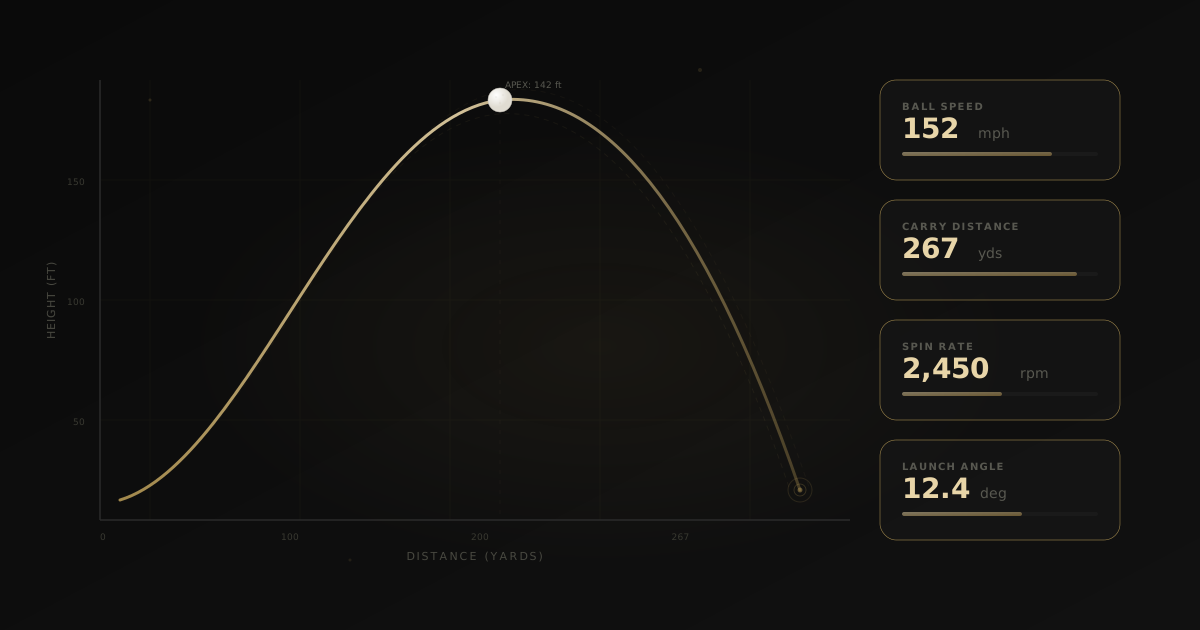
You just got a Rapsodo MLM2 Pro or spent an hour on a TrackMan bay. The screen is full of numbers. Ball speed, spin rate, launch angle, smash factor, carry, total distance, club path, face angle...
Which ones actually matter? And what should you do with them?
The Big Three: Ball Speed, Launch Angle, Spin Rate
These three numbers determine where your ball goes more than anything else.
Ball Speed is how fast the ball leaves the clubface. For a driver, amateur men average around 130-140 mph. Tour players sit around 170 mph. More ball speed = more distance, full stop.
Launch Angle is the initial angle the ball takes off at. For driver, the sweet spot is typically 12-15 degrees for most amateurs. Too low and you lose carry. Too high and you balloon.
Spin Rate is how much the ball spins per minute. For driver, you want low spin — around 2,000-2,500 rpm. For wedges, you want high spin for stopping power on the green. Too much driver spin turns distance into a ballooning mess.
Smash Factor: Your Efficiency Rating
Smash factor is ball speed divided by club head speed. It tells you how efficiently you're transferring energy to the ball.
- 1.50 is the theoretical max for a driver (solid center contact)
- 1.45-1.49 is excellent
- Below 1.40 means you're losing distance to mis-hits
If your ball speed is low but your club speed is decent, your smash factor will reveal the problem: you're not hitting the sweet spot consistently.
Club Path and Face Angle: The Shape Story
Club path tells you the direction your club is traveling at impact (relative to target line). Positive = inside-out. Negative = outside-in.
Face angle tells you where the clubface is pointing at impact.
The combination determines your shot shape:
- Inside-out path + slightly closed face = draw
- Outside-in path + open face = slice
- Square path + square face = straight (the unicorn)
Most amateurs have an outside-in path with an open face — the classic slice pattern. Seeing these numbers gives you and your coach a clear target.
What to Track Over Time
Individual session numbers are interesting, but trends are powerful. In Stroke Gained, you can import launch data from Rapsodo, TrackMan, GCQuad, and more. Over time, you'll see:
- Is your ball speed increasing? Better fitness, better contact, or better equipment?
- Is your spin rate normalizing? A sign that your mechanics are improving
- Is your dispersion tightening? The real measure of consistency
The goal isn't to chase any single number. It's to see meaningful trends in the metrics that matter for your game.
Pairing Launch Data with Swing Video
Here's where Stroke Gained connects the dots that other tools can't.
Your launch monitor tells you what the ball did. Your swing video tells you what your body did. Together, they paint the complete picture.
A 3,200 rpm spin rate on your driver isn't just a number — when paired with video, you might see an early extension pattern that's adding loft at impact. Now you have a cause and an effect, plus the data to prove whether your fix is working.
Getting Started with Stroke Gained
Import your launch data in seconds. We support CSV exports from all major monitors:
- Rapsodo MLM2, MLM2 Pro
- TrackMan 4, Range
- GCQuad / GCHawk
- Garmin Approach R10
- Generic CSV with column mapping
Once imported, your data is organized by session, visualized with trends, and available for your coach to review alongside your swing videos.
The numbers tell a story. Make sure you're reading it.
Written by Stroke Gained Team
The Stroke Gained team combines data science, golf instruction research, and AI to help golfers make smarter equipment and practice decisions.
Refine Your Game
Join golfers getting weekly data-backed insights.
No spam. Only gains.